
Turbo Checkout Link
for WooCommerce
Send customers straight to the checkout
with prefilled carts and boost conversions
Turbo Checkout Link lets you create direct-to-cart and direct-to-checkout URLs for WooCommerce, prefilled with the exact products you want customers to buy.
Fewer clicks, faster purchases, higher conversions.
Get it nowReady to go in minutes
Create a Turbo Checkout Link with a few clicks
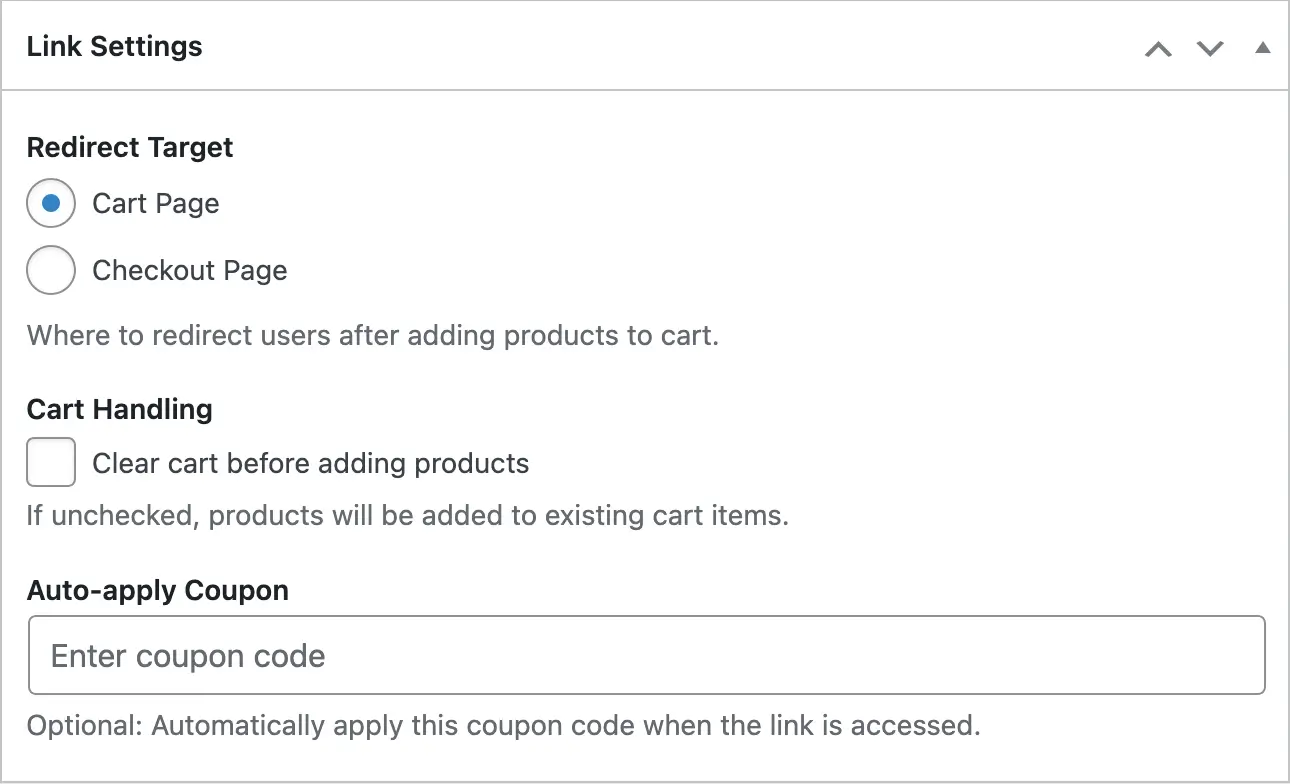
Redirect to cart or checkout page, auto-apply discount code
Set your link to direct the user to the cart or the checkout page, add discount code to automatically apply, and clear cart before adding products.
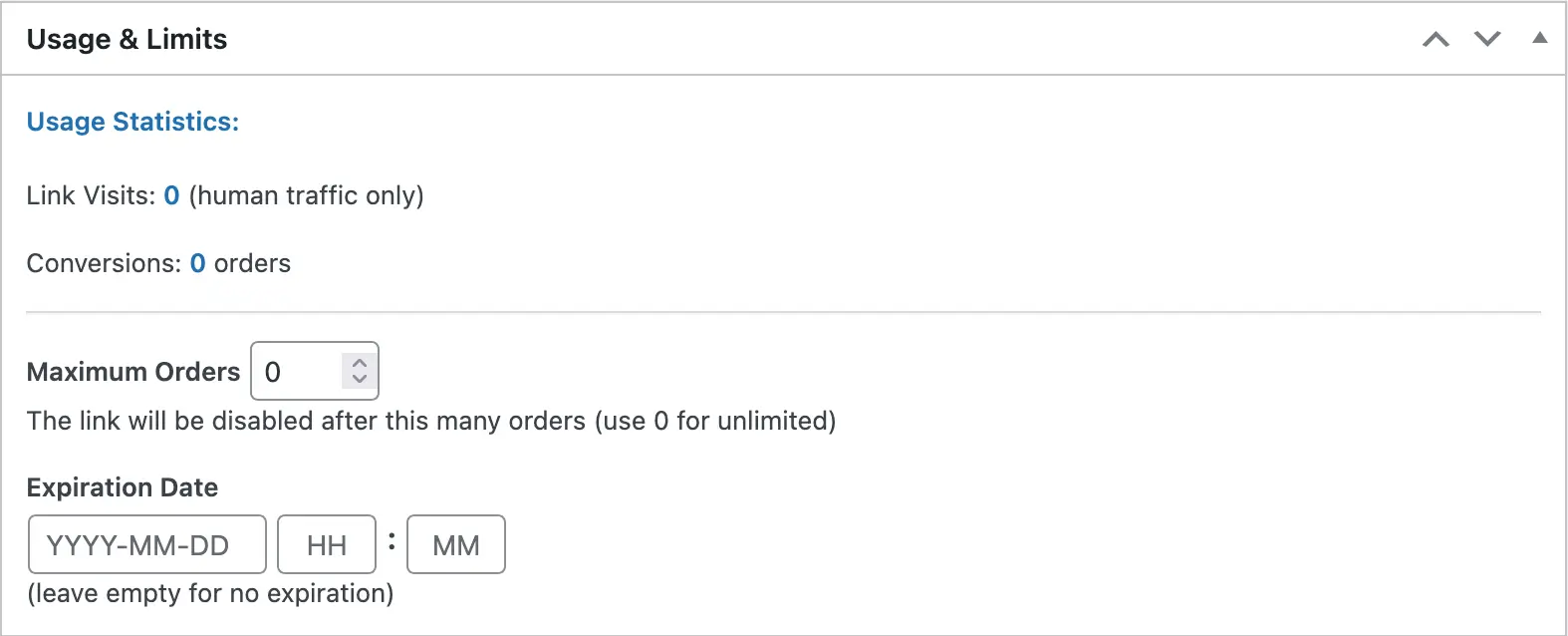
Limit usage
Set up order or date limits
How It Works
Install the Turbo Checkout Link plugin through your WordPress admin and you'll be able to create links that you can use to direct your visitors directly to the cart or checkout page with prefilled items, and even discount codes.
Share these links on social media, emails, use them in your ads, or wherever a link makes sense.
Visitors won't get lost in your store while searching for specific items, this can help boost your conversion rate.
Learn how to create your first Turbo Checkout LinkUse Cases
Email Campaigns That Convert Faster
Send customers directly to a prefilled cart from your newsletters or promotional emails. Reduce friction, eliminate extra clicks, and turn high-intent readers into instant buyers.
Social Media & Influencer Promotions
Give influencers or social posts a single, powerful link that loads the exact products you want them to promote. Perfect for limited-time offers, bundles, and fast-moving campaigns.
Curated Product Bundles & Upsells
Create customized product bundles and send shoppers straight to checkout with everything preloaded. Ideal for holiday sets, add-on offers, or high-value upsells that benefit from fewer steps.
Landing Pages & Funnels With Instant Checkout
Use direct-to-checkout links inside landing pages or paid ads to shorten the buying journey. Every click leads buyers exactly where you want them—no cart building, no confusion.
QR Codes for Instant Purchases
Place QR codes in packaging, posters, brochures, or retail displays that lead directly to a prefilled WooCommerce cart. Customers scan, tap, and buy—perfect for fast, on-the-go purchases.
Offline Marketing Made Actionable
Transform printed flyers, catalogs, event handouts, or product sheets into instant sales tools by linking to prebuilt carts. Bridge offline interest with an immediate online checkout experience.
Frequently Asked Questions
What is Turbo Checkout Link?
Turbo Checkout Link lets WooCommerce store owners create custom URLs that automatically prefill a customer’s cart and take them directly to the cart or checkout pages. This makes the buying process faster and more conversion-friendly.
How do I create a checkout or cart link?
In the plugin’s admin interface, simply choose the products and quantities you want to include, select whether the link should open the cart or checkout page, and generate the URL. You can then use this link anywhere you promote your store.
Where can I use these generated links?
You can add the links to emails, landing pages, ads, social media posts, QR codes, printed materials, influencer campaigns, or any marketing channel where you want customers to jump straight into a prebuilt cart.
Do the links work with product bundles or multiple items?
Yes. You can include as many products as you want in a single link, allowing you to create bundles, curated sets, upsells, or promotional combinations with just one click for the customer.
Will customers see the correct prices and discounts?
Yes. The cart will load with your store’s active prices, taxes, discounts, and coupons as usual. You can also include coupon codes in the link if you want to offer a specific promotion.
Does Turbo Checkout Link require coding knowledge?
No. The plugin is fully no-code, and you can generate links using a simple interface inside the WordPress admin. Just select your products and click Publish.
Can I track the performance of my links?
Yes. Turbo Checkout Link is compatible with standard tracking methods, so you can use UTM parameters or analytics tools to see where conversions are coming from.
Do the links work on mobile devices?
Absolutely. The generated URLs work on all modern devices and browsers, making them ideal for mobile-first campaigns, SMS promotions, and QR code usage.
What pricing options are available for Turbo Checkout Link?
You can choose from four options: a 1-year license for 1 site, a lifetime license for 1 site, a 1-year license for unlimited sites, or a lifetime license for unlimited sites.
What is the difference between yearly and lifetime licenses?
A yearly license includes updates and support for one year and needs to be renewed annually to continue receiving them. A lifetime license is a one-time payment that grants you updates and support as long as the plugin is developed and maintained.
Can I use the plugin on multiple sites?
Yes. You can choose either a 1-site license or an unlimited sites license. The unlimited option allows you to use Turbo Checkout Link on as many WooCommerce stores as you manage.
Do you offer refunds?
Yes. You can request a refund within 7 days if a feature is missing, the plugin didn’t work as expected, or you encountered a problem we couldn’t resolve—even if the issue is caused by a third-party plugin or theme.
How do I request a refund if I encounter an issue?
Simply contact us within 7 days of purchase. Provide details about the problem, and if it cannot be resolved, we’ll issue a full refund according to our policy.
Do I keep the plugin after requesting a refund?
After a refund is issued, your license becomes inactive and you should remove the plugin from your site, as updates and support will no longer be available.